Easy PC Back-up

Confirming/Changing the folder used to save imported videos and still images
You can change the folder used to save imported media files.
For details on the basic operations of Easy PC Back-up, refer to the “Picture Motion Browser Guide” supplied with the software (“Picture Motion Browser Guide”).
-
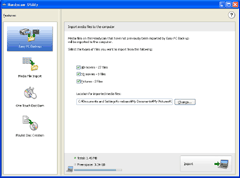
Click [Easy PC Back-up] in the [Handycam Utility] window, and click [Change].
-
Change/Confirm the folder used to save videos and still images in the [Save Location Settings] window.
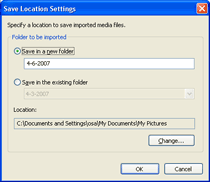
Videos and still images are saved in the folder created automatically. To save them in an existing folder, click the [Save in the existing folder] radio button, then select the folder to be used for saving imported videos and still images from the drop-down list.
To change the folder to be used for saving imported videos and still images, click [Change], and select the folder in which you want to save the videos or still images, or create a folder to be used in the window displayed.
- Click [OK].
|
Copyright 2007 Sony Corporation
|
P0053-01-US
|