Editing videos

Converting the video format
You can convert the format of video taken with your camcorder to more versatile format.
-
In the main window, select the video you want to convert.
 Hint
Hint- You can select two or more videos at the same time. (Hints on selecting videos and still images)
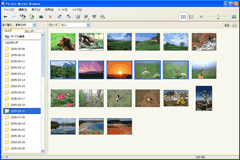
-
Select [Convert to MPEG-2 and Save] in the [Manipulate] menu.
The [Convert to MPEG-2 and Save] window is displayed.
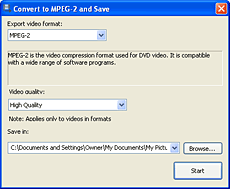
-
Specify where to save the video file.
Hint
- When the video format is AVCHD 1080i, it can be converted to MPEG-2 for SD (Standard Definition) image quality using the [Convert to MPEG-2 and Save]. The converted video can be used with the program which supports MPEG-2 format.
-
Click [Start].
The video file is converted and saved in the specified location.Hint
- When AVCHD 1080i format videos are included in the videos to be imported, converting videos takes some time.
|
Copyright 2007 Sony Corporation
|
P0011-01-US
|