Exporting AVCHD 1080i format videos saved on a computer to a “Memory Stick”

Exporting AVCHD 1080i format videos saved on a computer to the Memory Stick slot of the computer
You can export AVCHD 1080i format videos saved on the hard disk of a computer to a “Memory Stick” in the Memory Stick slot of the computer.
 Note
Note
- Videos recorded with SD (standard definition) image quality cannot be exported.
-
In the main window, select the AVCHD 1080i format video you want to export.
AVCHD 1080i format videos are marked with
 .
.
-
Select [Manipulate] and then click [Export To], [Handycam (Memory Stick)].
Exporting videos begins.
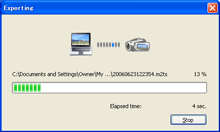
Note- Do not remove the “Memory Stick” while the video is being exported.
- When the completion dialog box appears, click [OK].
Note
- In the following cases, do not use the Memory Stick slot of the computer, but connect your camcorder to the computer with the USB cable:
- The computer is not compatible with a “Memory Stick PRO Duo.”
- A Memory Stick Duo adaptor is required.
- A “Memory Stick PRO Duo” cannot be read in the Memory Stick slot.
- Reading data from the Memory Stick slot is slow.
|
Copyright 2007 Sony Corporation
|
P0050-01-US
|