Manipulating videos and still images

Exporting videos and still images to “Memory Stick”(Date view supported)
You can export videos and still images in DCF format to “Memory Stick”.
When videos and still images contain information associated with the date view, that is also exported.
-
In the main window, select videos and still images to be exported from the main window.
 Hint
Hint- You can select two or more still images at the same time. (Hints on selecting videos and still images)
-
Select [Manipulate] - [Open with External Program] - [Image Export Tool].
A window to confirm the export is displayed.
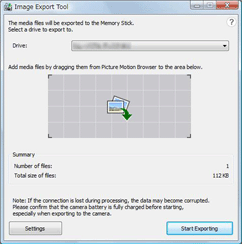
- In the [Image Export Tool] window, select the media drive to which the “Memory Stick” is inserted.
- Click [Start Exporting].
Hint
- You can also start the program by selecting [Start] - [All Programs] - [Sony Picture Utility] - [Image Export Tool].
- By clicking [Settings], you can change the size of still images to be exported. When changed, the exported images will lose the features related to face information.
- You can also add the videos and still images to be exported by dragging them onto the [Image Export Tool] window.
 Notes
Notes
- Information in Favorites that you have added using the digital camera is not reflected.
- Exif compatible JPEG images or videos recorded with SONY digital camera (MPEG1 compatible) can be exported. Depending on the file, sometimes even Exif compatible JPEG images cannot be exported.
- File name of exported files will be changed to DCF standard.
- Videos and still images that are not recorded with this camera may not be exported.
|
Copyright 2008 Sony Corporation
|
P0168-01-US
|