Importing images

Importing images from the Memory Stick slot of a computer
You can import the images stored on a “Memory Stick Duo” by inserting the “Memory Stick Duo” into the Memory Stick slot of your computer.
- Turn on the computer.
- Insert a recorded “Memory Stick Duo” into the Memory Stick slot on your computer.
-
Double-click
 (PMB) on the desktop.
[PMB] starts up.
(PMB) on the desktop.
[PMB] starts up. - Click
 at the top of the window.
Or, select [Import Media Files] in the [File] menu.
at the top of the window.
Or, select [Import Media Files] in the [File] menu.
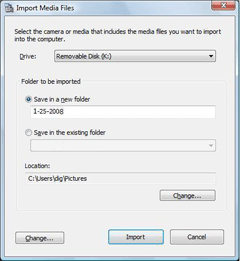
The window used to select the drive/folder for the images to be imported from/to is displayed.
-
Click [Import].
 Hint
Hint- The images are imported all at once. You can not import selected image.
|
Copyright 2008 Sony Corporation
|
P0266-01-US
|