Changing the Working Environment

Registering an external program
You can register an external program in advance to use to adjust an
image previewed on the document window with the registered program.
You can register up to three programs.
Follow the procedures on this page to add or remove an external program.
 When
you start the software for the first time
When
you start the software for the first time
If Adobe Photoshop CS2, Adobe Photoshop Elements 4.0/5.0, or another image-processing
program is installed on your computer, a confirmation message asking you
to register Photoshop as an external program is displayed. Select [Yes]
to use an external program to process or edit an image modified with Image
Data Converter SR.
- Click [Settings] from the [Tools]
menu.
The [Settings] window is displayed.
In the [Registered programs] list box of the [External Programs] tab, the registered image-editing programs are displayed.
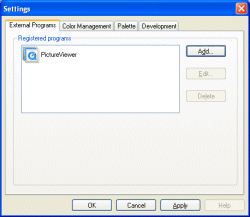
- Click [Add] to add a new program
or [Edit] to edit a registered program.
The [External Program] window is displayed.
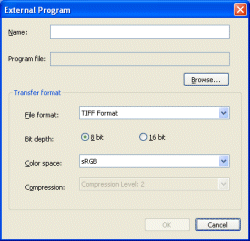
Name/Program file In the [Name] text box, the name of the registered program is displayed. In the [Program file] box, the directory where the program is located is displayed. To add or edit the settings, click [Browse...] and specify the external program to be registered. Transfer format Specify the file format or other settings to be used when an image is sent to a registered external program. - File format: Select form [JPEG] (for image data compression) or [TIFF] (for high quality printing).
- Bit depth (for Tiff only): Select the data bit depth either from [8 bit] or [16 bit].
- Color space: Select [sRGB], [AdobeRGB], or [Wide Gamut RGB].
- Compression (for JPEG only): Specify the compression level. The higher the compression rate is, the smaller the file size. The lower the compression rate is, the higher the picture quality.
- Click [OK] when the settings are completed.
|
Copyright 2007 Sony Corporation
|
A0001-01-US
|