Changing the Working Environment

Changing the development settings
You can change the development settings as follows.
- Click [Settings] from the [Tools]
menu.
The [Settings] window is displayed.
- Click [Development].
The [Development] window is displayed.
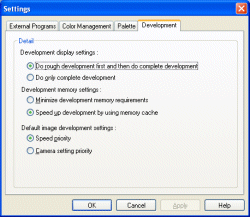
Development display settings - Do rough development first and then do complete development: After the corrections, an image is developed roughly and displayed quickly. After this rough development, the image is developed completely.
- Do only complete development: Rough development for quick display will not be performed and complete development is only performed. When you are using a CoreDuo processor or higher-performance processor, this option is recommended.
Development memory settings - Minimize development memory requirements: Memory consumption is minimized.
- Speed up development by using memory cache: Development speed is the highest possible.
Default image development settings - Speed priority: Default image development settings will be made by giving the priority to speed. The [D-Range Optimizer: Advanced] and [Noise Reduction] items are enabled. The settings cannot be applied to a saved RAW file.
- Camera setting priority: Default image development settings will be made by giving the priority to the picture quality. The settings cannot be applied to a saved RAW file.
- Click [OK] when the settings are completed.
|
Copyright 2007 Sony Corporation
|
A0027-01-US
|