Version Stack Function

Using the version stack function
 What
is the “Version Stack”?
What
is the “Version Stack”?
RAW data in the ARW2.0 format can contain multiple image processing data, so you can save multiple sets of results from various edits as groups of parameters in a RAW file. This group of parameters is called a “version.”
Displaying the version stack window
Click (Version Stack)
on the tool bar or select [Version Stack] from the [Palettes] menu.
(Version Stack)
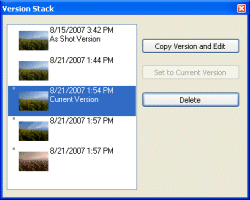
on the tool bar or select [Version Stack] from the [Palettes] menu.The [Version Stack] window is displayed. An asterisk (*) appears next to an image that has been modified.
Creating a new version
On the [Version Stack] window, click [Copy Version and Edit]. The currently selected version is copied and added as a new version.Switching versions
Click the version that you want to edit in the [Version Stack] window.Setting the version being edited as the current version
In the versions list, click the version that you want to set as the current version, and then click [Set to Current Version]. The next time you start the program, the window opens with the selected image as the current version.What
is the “current version”?
The version to be used when a particular version is not specified is called
the “current version.” Deleting the version being edited
Click the version that you want to delete in the versions list, and then click [Delete]. The selected version is deleted and the preceding version replaces the deleted version. You cannot delete the shot version. If you delete the current version, the shot version becomes the current version.|
Copyright 2007 Sony Corporation
|
A0008-01-US
|