Making Settings

Items that you can set with the Remote Camera Control
The following are the items that you can set on the display and setup
panels of the Remote Camera Control and those that you can set with
your camera.
 : You can set the
feature.
: You can set the
feature.
—: You can only display the feature.
Display panel
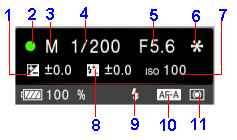
| Items | Camera Settings | Remote Camera Control Settings | |
| 1 | Exposure correction value |
|
|
| 2 | Focus display |
|
—
|
| 3 | Mode dial |
|
—
|
| 4 | Shutter speed |
|
|
| 5 | Diaphragm value |
|
|
| 6 | AE lock |
|
—
|
| 7 | ISO studio tungsten |
|
|
| 8 | Flash compens. |
|
|
| 9 | Flash mode |
|
—
|
| 10 | Focus mode |
|
—
|
| 11 | Metering mode |
|
—
|
Setup panel
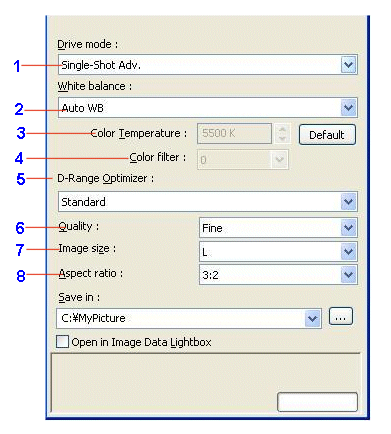
| Items | Camera Settings | Remote Camera Control Settings | |
| 1 | Drive mode |
|
|
| 2 | White balance |
|
* |
| 3 | Color Temperature |
|
|
| 4 | Color filter |
|
|
| 5 | D-Range Optimizer |
|
|
| 6 | Quality |
|
|
| 7 | Image size |
|
|
| 8 | Aspect ratio |
|
|
|
Copyright 2007 Sony Corporation
|
A0023-01-US
|