Importing GPS log files

Keeping GPS log files stored in your GPS Unit
In default setting, once you import GPS log files to your computer, the files are automatically deleted from the GPS Unit. You can also make settings to keep the GPS log files stored in the GPS Unit if you do not want to delete them.
Follow the steps below to keep GPS log files stored in the GPS Unit.
Follow the steps below to keep GPS log files stored in the GPS Unit.
|
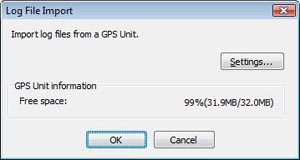
Connect the GPS Unit to your computer. The Log File Import window appears.
|
|
|
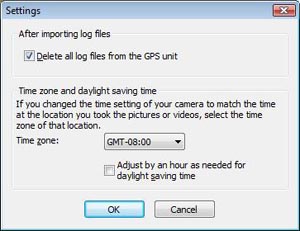
Click [Settings] on the Log File Import window to display the Settings window.
|
|
|
Click the checkbox of [Delete all log files from the GPS unit] to clear it, and then click [OK].
|
Tip
- When you keep GPS log files in the GPS Unit, these files accumulate in the unit's memory. If the free space of the GPS Unit becomes less than 10 %, it is recommended to delete log files from the unit. Before you delete the log files, copy these files to your computer if required.
- This setting will remain effective even after your computer is powered off.
Copyright 2008 Sony Corporation