Importing images

Viewing the detailed information
You can view the following detailed information by double-clicking a thumbnail of the images displayed on the image file list.
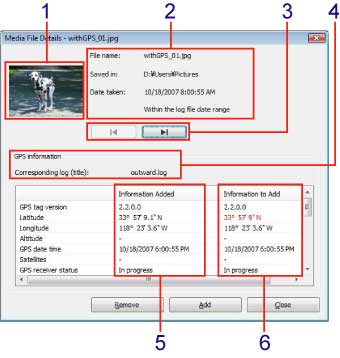
| Displays the thumbnail of recorded image. | |
| Displays the filename, storage location, and date/time of recording. | |
| Displays the previous or next image in the image file list. | |
| Displays the title and position information of the GPS log file corresponding to an image. | |
| Displays the current information associated with the selected image. | |
| Displays the contents of the GPS log file and longitude and latitude on the map where the image was taken. When the information displayed in this section is different from the information displayed in section 5, information that is different is displayed in red. |
Copyright 2008 Sony Corporation