
 ], and select the removing method from the displayed drop-down list.
Importing images
Removing images from the image file list
You can remove imported images from the image file list.
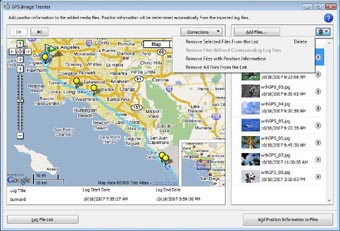
Select the image to be removed from the image file list, click [], and select the removing method from the displayed drop-down list.
], and select the removing method from the displayed drop-down list.When an image is removed from the image file list, its pin icon will no longer be displayed on the map.
The methods of removing an image are described below.
| Remove Selected Files From the List | Removes a selected image. |
| Remove Files Without Corresponding Log Files | Removes only images that have no matching recording date/time in a GPS log file. |
| Remove Files with Position Information | Removes only images that already have their position information saved. |
| Remove All Files From the List | Removes all images in the image file list. |
Note
Even if you remove an image from the image file list of this software, the original image will remain stored in your computer.
Copyright 2008 Sony Corporation