Managing GPS log files

Editing the title or time difference of a GPS log
You can assign a title or change the time difference to make it easier to manage the imported GPS log files.
Follow the steps below to edit the GPS log files.
Select a GPS log to be edited from the log file list.
|
|
|
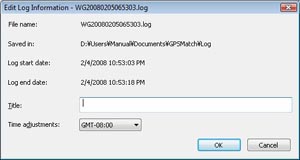
Select a GPS log to be edited and double-click to display the Edit Log Information window.
|
|
|
Enter the title to be edited in the textbox.
Select [Time adjustments:] to select the desired time difference setting from the displayed drop-down list. |
Copyright 2008 Sony Corporation