Parts and controls of the video/photo selection window
When you select [Select media files to import] in the video/photo import window, the video/photo selection window is displayed, and you can select videos and photos to import.
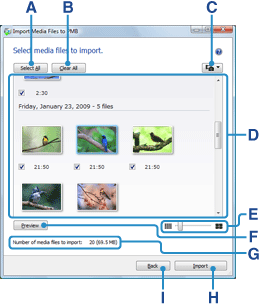
| A | Select all button | Click to put a check next to all videos and photos. |
| B | Clear selection button | Click to clear all checks of the selected videos and photos. |
| C | Filter button | Click and then select [Show Photos Only] or [Show Videos Only] to filter videos and photos. |
| D | Video/photo list | A list of videos and photos recorded is displayed as thumbnail images grouped by date shot. Put a check in the checkbox of the video or photo you want to import. |
| E | Image adjustment slider | You can adjust the thumbnail size by moving the slider. |
| F | Preview button | Click to open the preview window, and play back or display the video or photo selected. |
| G | Number of media files to import | The number of videos and photos to be imported is displayed. |
| H | Import button | Click to start import of the videos and photos. |
| I | Back button | Click to return to the import window. |