Utilizing a Collection

Hints on using a collection
A “collection” is a database used to manage the operations
status of the still images in the Lightbox window. You can save a list
of the still images displayed in the preview and thumbnail windows,
along with windows and other operations status information as a collection
(LBW) file.
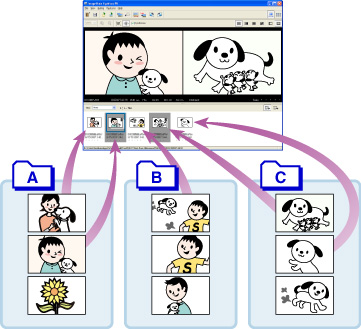
- You can select and register images from multiple folders to create a collection.
- You can remove unnecessary images from a collection. ([Features] - [Remove from Collection]) *The image itself is not removed.
- By opening the collection file, you can resume the operations from its status when last terminated.
- You can use the [Do Not Save Collection and Open a Folder...] from the [File] menu to display the images by folder.
- You can use [Recent Collections] to open a collection from those used most recently.
|
Copyright 2007 Sony Corporation
|
A0020-01-US
|