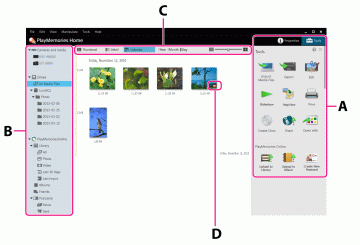
 Import Media Files Import Media Files |
Click to import videos or photos to a computer. |
 Export Export |
Click to export videos and photos to various types of media other than optical discs. |
 Edit Media Files Edit Media Files |
Click to edit a video or photo. |
 Slide Show Slide Show |
You can select videos or photos and play them as a full-screen slide show. |
 Map View Map View |
Click to display the Map View. |
 Print Print |
Click to print a photo. |
 Create Discs Create Discs |
Click to create discs. |
 Share Share |
Click to upload videos or photos to sharing services. |
 Open With Program Open With Program |
You can utilize videos and photos using other applications installed on your computer. |
 Upload to Library Upload to Library |
Click to upload videos or photos to a “PlayMemories Online” library. (Only for countries/regions supporting “PlayMemories Online”) |
 Upload to Album Upload to Album |
Click to upload videos or photos to a “PlayMemories Online” album. (Only for countries/regions supporting “PlayMemories Online”) |
 Create Postcard Create Postcard |
Click to send videos or photos as a postcard using “PlayMemories Online.” (Only for countries/regions supporting “PlayMemories Online”) |
 Tools Tools |
Click to display the Tool area. |
 Properties Properties |
Click to display the properties of the selected video or photo. |
 |
Video with high definition image quality (HD) |
 |
Edited video |
 |
RAW data |
 |
RAW+JPEG data |
 |
Photo with GPS location information |
 |
Sweep Multi Angle photo |
 |
Video recorded in 3D/3D still image/3D Sweep Panorama photo |
 |
Video to which the segment played back with Highlight playback is saved |
 |
Main image in a burst group |
 |
Video or photo imported last time |
 |
The image uploaded to “PlayMemories Online” |
 |
Indicated when unable to find a photo or video. If you do not need to display this icon, you can clear it by selecting the [View] menu - [Refresh], or the [Tools] menu - [Update Database]. |
 |
Indicated when unable to display a photo or video. |

 /
/ /
/

