FAQ's on Picture Motion Browser are introduced by category.
Category
 |
: Question |
 |
: Answer |
 |
|
|
|
|
|
|
|
|
 |
Though the Image Database File of camcorder was damaged, videos with HD (high definition) image quality can be imported into your computer by using the Picture Motion Browser, if a new Image Database File is created.
Operate in the following procedures.
Connect your computer and camcorder via USB connection cable. The [USB SELECT] is displayed on the LCD screen of camcorder.
-
Touch the [  COMPUTER].
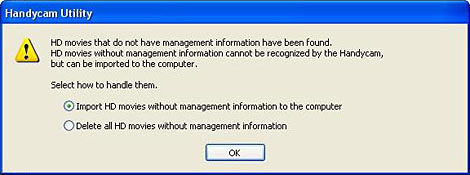
[Handycam Utility] is displayed on the computer screen, and the following message is shown. If the [Handycam Utility] is not displayed, start it from the start menu.
When you import the videos with HD (high definition) image quality into your computer, select [Import HD movies without management information to the computer], and click [OK]. The [HD Movie Recovery] screen in the [Handycam Utility] is displayed, and the thumbnails of videos with HD (high definition) image quality that have no management information are shown.
Click and check the thumbnail of the video that you want to import into your computer. Click [Import]. Import starts. After import is completed, the following message is shown.
[Import completed.
All HD movies that do not have management information will be deleted. HD movies without management information that were not imported will also be deleted.
Are you sure you want to continue?]
-
When you delete all the videos
with HD (high definition) image quality that has no management
information from the hard disk in the camcorder, click [Yes].
If you do not delete it, click [No].
 Note Note
Even when you selected [Yes], videos with HD (high definition) image quality that were recorded after [Image Database File] were created are not deleted.
|
|
|
|
|
|
|
Copyright 2008 Sony Corporation